Pointing URL Branded Domain Steps
Example of branded domain: https://bizmatch.singaporeairshow.com
Utilise Domain Checker: https://dnschecker.org/
Step 1: Enter the branded domain URL on DNS Checker
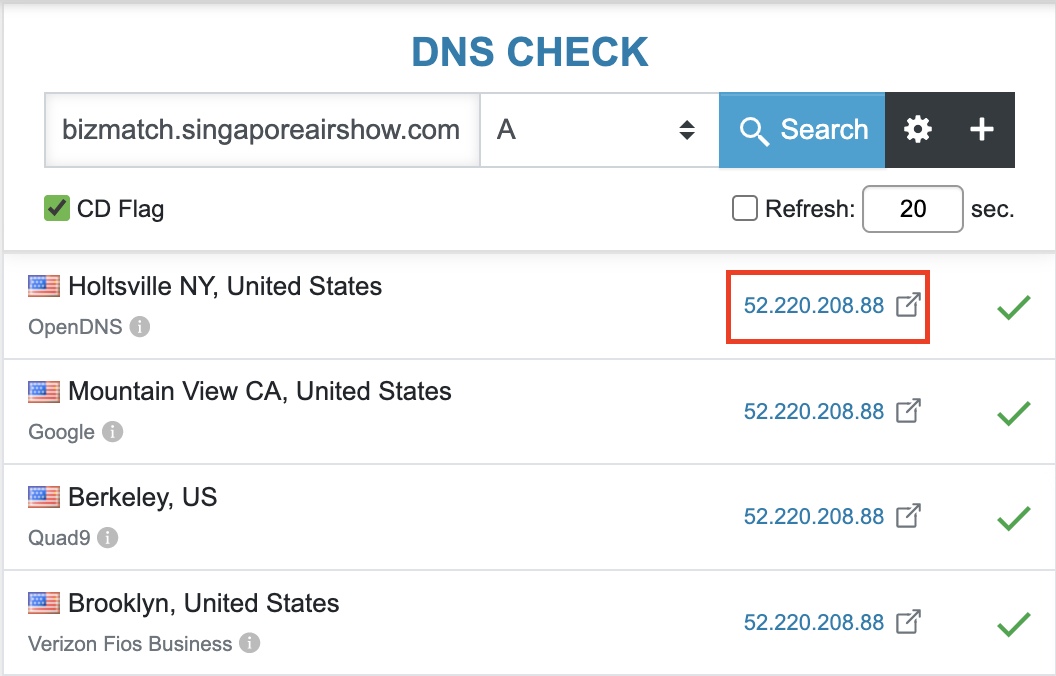
Step 2: Ensure that the domain is pointed to the Jublia IP - 52.220.208.88
Step 3: Enter all the necessary details on the Active Branded Domain Excel Sheet
Step 4: On Google Chat Channel - Customisation & API set a task and assign it to Nikho. Set the task completion date to +1 Day later

Step 5: Great job! The setting up of branded domain is now complete
[IMPORTANT]
For URL Branding that is PROXY related.
Scenario: A case where the organiser has confirmed that they already pointed to our IP but the DNS checker result shows otherwise.
CS Action: We have to ask the organiser to disable their proxy on Cloudflare
Let them know that it will only be temporary during the setup phase. We will provide the SSL certificate and set it up for them on our end so that in the end it will still be having a secure connection.